
The Biggest Realtor Headshot Mistakes (And How to Fix Them for 2026)
Your headshot works before you ever speak. It's the first thing buyers and sellers judge, the image they attach to your name, and the photo they use to decide whether to call you or keep scrolling.
Small mistakes, an outdated photo, a messy background, or an over-edited face can make professional agents look less credible online. And in a market where buyers start their search digitally, those perception issues translate into lost business.
The good news? Fixing these mistakes takes minutes with AI tools. No reshoots, no expensive photographers, no wardrobe overhauls. You can refresh your entire visual brand today and finally present the polished, trustworthy image your market expects.
This guide breaks down the most common realtor headshot mistakes and shows you exactly how to fix each one.


Why Your Realtor Headshot Actually Matters
Real estate is a trust business. People hire agents they feel comfortable with before ever meeting in person. Your headshot is often that first impression.
What your headshot communicates:
- Professionalism and attention to detail
- Whether you're current and market-aware
- If you understand your target clientele
- How seriously you take your business
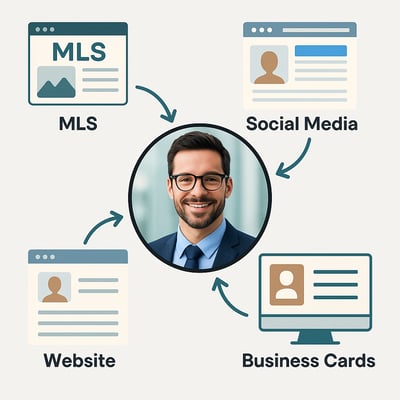
The National Association of Realtors reports that 97% of buyers use online resources during their home search (2024 data). Your headshot appears on every platform they find you: MLS listings, Zillow profiles, social media, your website, email signatures, and business cards.
An outdated or amateur headshot undermines otherwise strong marketing. A professional, consistent headshot builds recognition and trust.
Mistake #1: Using an Outdated Headshot
If your hair, style, or appearance looks different from your current photo, clients feel an immediate disconnect when meeting you. Outdated headshots break trust before conversations begin.
Signs your headshot is outdated:
- It's more than 2-3 years old
- Your hairstyle or facial hair has changed
- You've gained or lost significant weight
- Your glasses are different
- The photo quality looks pre-2020
- You look noticeably different on video calls
When your headshot doesn't match your current appearance, buyers unconsciously wonder: "If this photo is outdated, what else is outdated?"
How to fix it:
Real estate headshots should be updated every 12-18 months, at a minimum. More frequently if your appearance changes noticeably.
AI headshot tools let you refresh your photo without scheduling shoots or waiting for photographer availability. Generate updated versions that match your current look in minutes, not weeks.
Outdated headshots cost you trust before the first conversation.
Mistake #2: Over-Edited or Filtered Photos
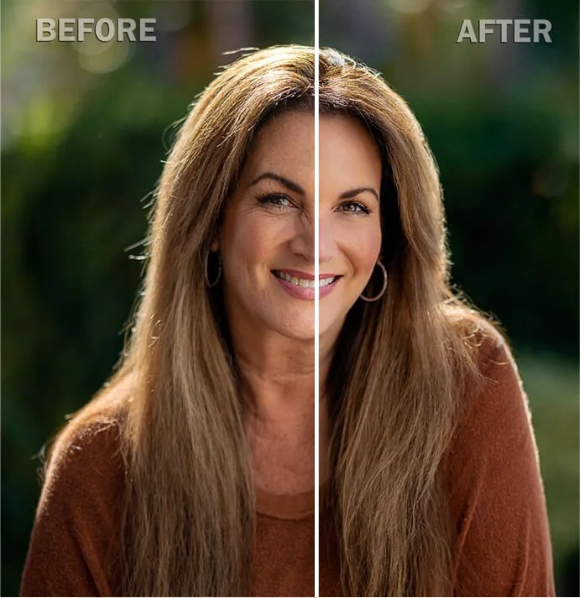
Heavy filters, aggressive smoothing, or unrealistic retouching makes photos look fake. When your skin has zero texture, your teeth glow unnaturally bright, or your face looks plastic, clients notice—and trust drops.
Common over-editing mistakes:
- Skin smoothing that removes all natural texture
- Teeth whitening beyond realistic appearance
- Face reshaping (jawline, cheeks, nose)
- Instagram-style glamour filters
- Eyes brightened until they look unnatural
- Excessive glow or soft-focus effects
Why this kills credibility:
People equate heavy editing with hiding something. Over-smoothing removes emotional warmth from faces. When clients meet you in person and you look different from your photo, the mismatch damages trust immediately.
How to fix it:
Use professional retouching, not filters. Remove temporary blemishes or stray hairs. Adjust lighting and color balance. But maintain natural skin texture, realistic eye brightness, and authentic facial features.
AI retouching tools handle this automatically—enhancing clarity without crossing into unrealistic territory.
Natural photos build more trust than perfect ones.
Mistake #3: Distracting or Messy Backgrounds
Busy backgrounds pull attention away from your face. When the backdrop includes random people, cluttered offices, or irrelevant scenery, clients remember the background—not you.
Background mistakes that hurt your headshot:
- Busy city streets with cars or people
- Cluttered office environments
- Overly dramatic studio backdrops
- Fake-looking AI-generated luxury backgrounds
- Settings that don't match your market
- Harsh lighting creating weird color casts
The rule: If your background draws attention, it's wrong.
Your backdrop should quietly support your brand, not compete with your face. Clean, neutral backgrounds convert best. Subtle market-aligned settings (urban, suburban, luxury) reinforce identity without overwhelming the image.
How to fix it:
Choose simple backgrounds with soft blur or neutral tones. For market alignment, use subtle environmental cues—modern architecture for urban markets, natural settings for suburban, refined interiors for luxury.
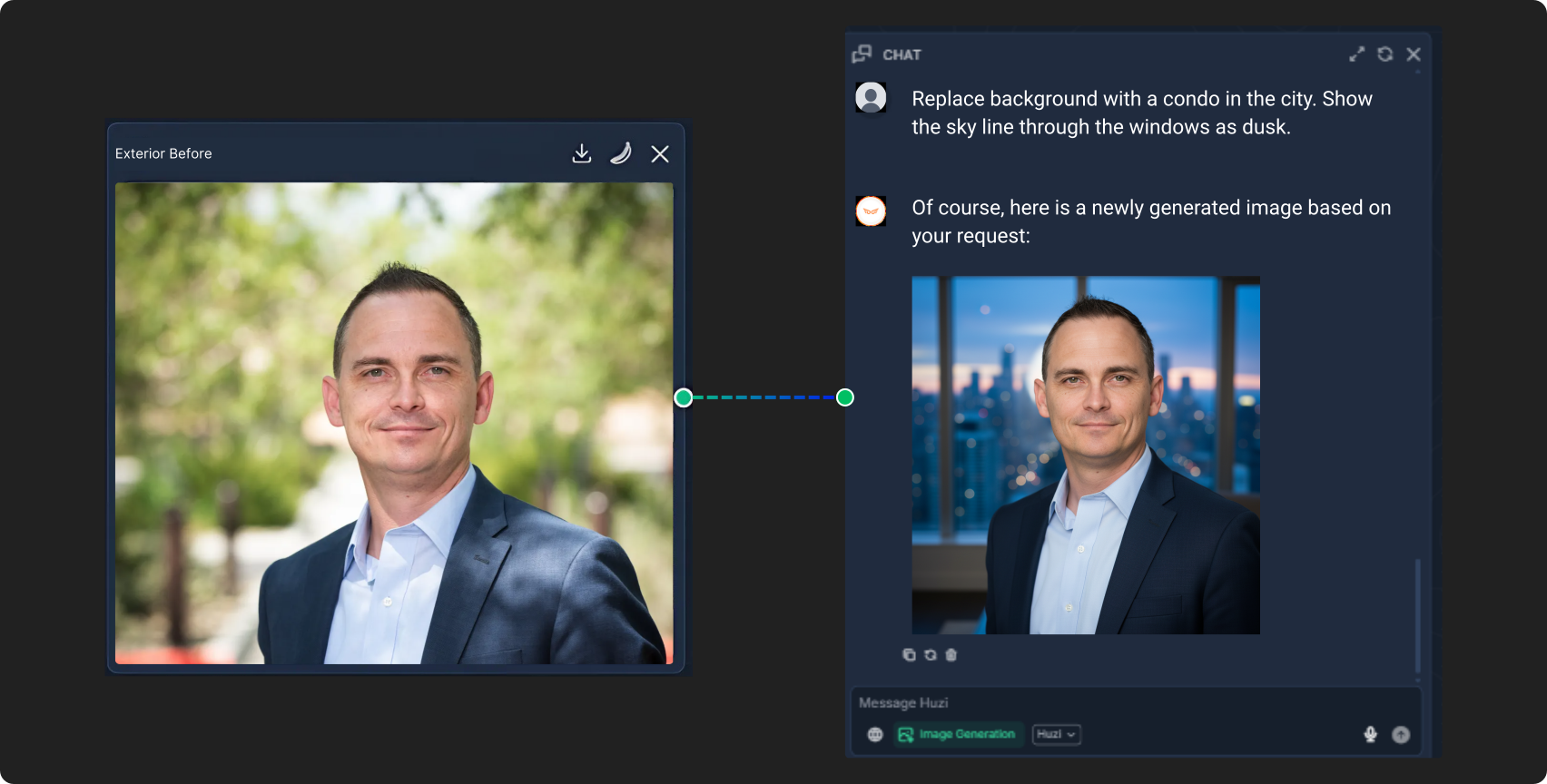
AI background replacement tools let you test different backdrops instantly without reshoots.
Clean backgrounds keep attention where it belongs—on your expression.

Mistake #4: Poor Lighting Quality
Bad lighting ages photos, flattens features, and makes expressions look harsh or tired. Harsh shadows, uneven brightness, or low-quality indoor lighting reduces perceived professionalism immediately.
Common lighting problems:
- Overhead lights creating dark eye shadows
- Harsh midday sun causing squinting
- Backlit photos where face appears dim
- Indoor lighting casting yellow or blue tones
- Uneven brightness highlighting one side more
- Grainy low-resolution from poor lighting
Why lighting matters:
Clients associate well-lit photos with professionalism. Poor lighting emphasizes problems instead of personality. Dark or uneven tones make you look stressed, tired, or outdated.
How to fix it:
Use soft, even lighting. Natural light near windows works best. Avoid harsh direct sunlight and overhead fixtures. Keep background evenly lit to prevent distractions.
AI lighting correction tools adjust brightness, remove shadows, and balance tones automatically—turning mediocre lighting into professional quality.
Soft, even lighting creates the most trustworthy headshots.
How AI Fixes Headshot Problems in Minutes
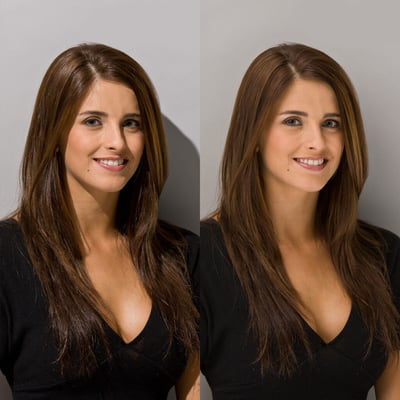
Most headshot mistakes like outdated photos, inconsistent branding, messy backgrounds, and poor lighting can be fixed without reshoots. AI headshot tools refresh your look, match your market, and maintain consistency across platforms instantly.
What AI headshot tools do:
Refresh Outdated Photos
Generate updated versions reflecting your current appearance without scheduling photographers. Create seasonal variations or campaign-specific looks while maintaining brand consistency.
AI keeps headshots current without constant photoshoots.
Natural Professional Retouching
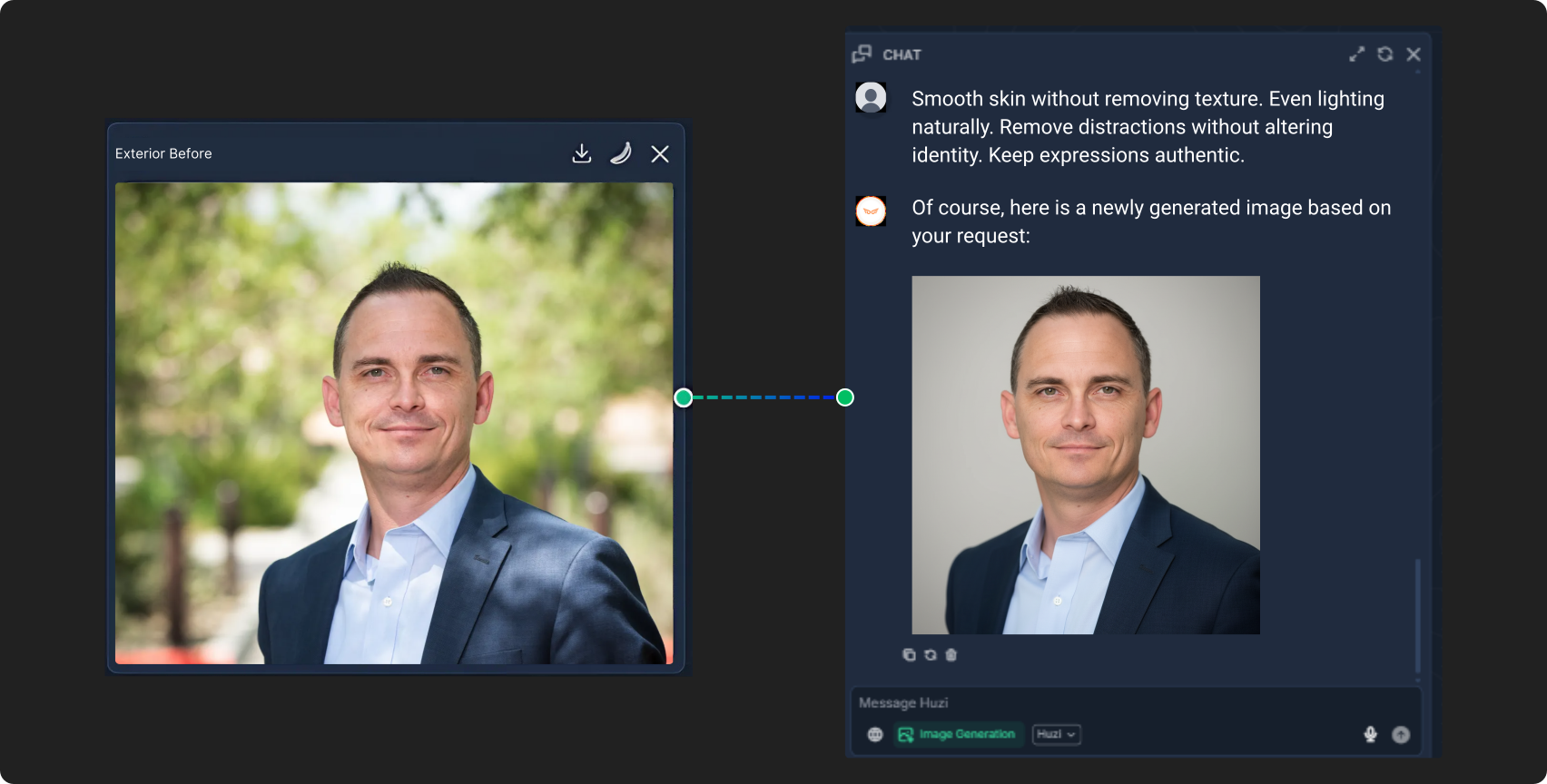
Smooth skin without removing texture. Even lighting naturally. Remove distractions without altering identity. Keep expressions authentic.
AI retouching enhances clarity without compromising authenticity.
Clean Market-Appropriate Backgrounds
Replace distracting backgrounds with luxury, suburban, urban, or coastal styles. Add soft blur and depth naturally. Generate Instagram, MLS, and website-ready versions instantly.
AI backgrounds reinforce brands without distracting from faces.
Outfits That Match Your Market
Test professional outfit options digitally. Generate market-specific styles—luxury, suburban, urban, coastal. Maintain consistent color palettes. No wardrobe purchases needed.
AI styling matches ideal clients without wardrobe stress.
Tailored Looks for Target Clients
Luxury markets: polished, refined visuals. Suburban buyers: warm, friendly tones. Urban markets: modern, sleek aesthetics. Coastal markets: lighter, natural styling.
AI alignment makes headshots feel native to markets.
Real Estate Headshot Best Practices
Beyond avoiding mistakes, follow these principles for maximum effectiveness.
Update Regularly
Update headshots every 12-18 months minimum, more frequently if appearance changes. Regular updates signal you're current and active in the market.
Maintain Brand Consistency
Use identical headshots across all platforms. When you update, update everywhere simultaneously. Consistency builds faster recognition than any other branding tactic.
Match Your Market
Study successful agents in your niche. Notice their visual patterns. Align your headshot with those expectations while staying authentic.
Keep It Natural
Authentic beats perfect. Light retouching acceptable, heavy filtering destroys trust. Clients want to recognize you when meeting in person.
Test Variations Before Committing
AI tools let you preview different backgrounds, outfits, and styles before deciding. Test extensively, then commit to one consistent look.
Prioritize Professional Quality
Amateur selfies undermine otherwise strong marketing. Invest in quality—either professional photography or professional AI tools that produce comparable results.
Professional headshots are business assets, not vanity expenses.
Realtor Headshot Self-Audit
Evaluate your current headshot in 30 seconds with these questions:
✓ Does this photo look like me right now? If your appearance has changed even slightly, it's outdated.
✓ Is the background clean and professional? Busy or distracting backgrounds need fixing immediately.
✓ Is the lighting soft and flattering? Harsh shadows or poor indoor lighting reduce trust.
✓ Does my expression look natural and confident? Forced smiles or awkward poses make you look uncomfortable.
✓ Does my outfit match my target market? Your wardrobe should align with client expectations.
✓ Do I use this exact headshot everywhere? Clients should recognize you instantly across all platforms.
✓ Does this photo feel modern and high-quality? Dated, grainy, or over-edited photos need immediate replacement.
✓ Would I trust this person if I saw this online? The most important question—clients are asking it subconsciously.
A strong headshot makes people confident hitting "Contact Agent."
Professional Headshots vs. AI Headshots
Traditional professional photography and AI-generated headshots both have places in modern real estate marketing.
Traditional Professional Photography
When it makes sense:
- Initial brand photography for complete marketing suite
- Team photos requiring consistent lighting
- Lifestyle shots showing you with clients or at properties
- High-budget branding campaigns
Costs: $200-500 per session, additional fees for retouching and multiple looks.
AI-Generated Headshots
When it makes sense:
- Quick updates when appearance changes
- Testing market-specific variations
- Creating platform-specific crops and formats
- Maintaining consistency without constant reshoots
- Budget-conscious branding updates
Costs: $20-50 monthly for unlimited generation and variations.
Best Approach
Most successful agents use both: professional photography every 12-24 months for primary assets, AI tools for variations, updates, and platform-specific formatting between professional sessions.
This combination provides professional quality with ongoing flexibility at reasonable cost.
How to Update Your Headshot with AI
Refreshing your headshot with AI tools takes 10-15 minutes from start to finished professional photos.
Step 1: Upload Current Photo
Use your most recent professional photo or high-quality selfie. Well-lit, clear focus, front-facing angle works best.
Step 2: Describe Desired Updates
Specify what needs changing: background style, outfit adjustments, lighting improvements, or market-specific variations.
Example prompts:
- "Professional real estate headshot, luxury market, neutral background, business formal"
- "Warm approachable headshot for suburban family market, natural lighting"
- "Modern urban realtor headshot, sleek background, contemporary professional"
Step 3: Generate Variations
AI creates multiple options showing different backgrounds, lighting, and styling approaches. Review and select top candidates.
Step 4: Refine and Finalize
Adjust details if needed. Generate additional variations until you find the perfect look. Download high-resolution versions.
Step 5: Deploy Across Platforms
Update all platforms simultaneously—MLS, website, social media, email signature, business cards. Maintain perfect consistency everywhere.
With Huzi, this process happens in one integrated workspace. Generate headshots, create matching marketing materials, and maintain brand consistency automatically.
Common Questions About Real Estate Headshots
How often should real estate agents update headshots?
Real estate agents should update headshots every 12-18 months minimum. Update more frequently if your appearance changes significantly—new hairstyle, weight change, glasses, or facial hair. Outdated photos damage trust when clients meet you in person and you look different from your marketing.
What should real estate agents wear in headshots?
Real estate agents should wear outfits matching their target market expectations. Luxury markets require tailored blazers and refined styling. Suburban markets favor approachable business casual. Urban markets suit modern contemporary looks. Avoid bold patterns, heavy jewelry, and clothing that blends into backgrounds.
Can AI create professional real estate headshots?
Yes. AI creates professional real estate headshots by enhancing existing photos with better backgrounds, lighting, and styling. Modern AI tools produce results comparable to professional photography at fraction of the cost. Best for updates, variations, and platform-specific formatting between traditional photography sessions.
Should realtor headshots have backgrounds?
Realtor headshots should have clean, simple backgrounds that don't distract from faces. Neutral backgrounds work universally. Market-specific subtle backgrounds (urban architecture, natural settings, refined interiors) reinforce brand when done tastefully. Avoid busy, cluttered, or overly dramatic backgrounds.
How much do professional real estate headshots cost?
Professional real estate headshots cost $200-500 per session with traditional photographers, plus additional fees for retouching and multiple looks. AI headshot tools cost $20-50 monthly for unlimited generation and variations. Most agents use both: professional photography annually, AI tools for ongoing updates.
What makes a good real estate agent headshot?
Good real estate agent headshots feature current appearance, natural expressions, clean backgrounds, appropriate market-aligned styling, professional lighting, and consistent use across all platforms. Headshots should look polished without heavy editing, match target clientele expectations, and make viewers feel comfortable contacting the agent.
Your Headshot Is a Business Asset
Your headshot isn't just a photo. It's the first impression, the brand anchor, and the trust signal that influences whether clients choose you over the next agent.
Small mistakes—outdated appearance, messy backgrounds, over-editing, market mismatches—quietly cost you business. Good news? Those mistakes take minutes to fix with modern tools.
You don't need constant photoshoots or expensive retouching. AI tools make professional, consistent, market-aligned headshots accessible to every agent. Update your look, test variations, maintain consistency, and present the polished image your business deserves.
Great visuals help great agents get noticed.
Ready to refresh your headshot and create consistent professional images for all your platforms? Try Huzi and generate clean, polished, market-ready headshots in minutes. Your next great first impression is one photo away.
Related Articles
Headshots for Real Estate Agents: Complete guide to professional headshots that build trust and get you noticed. Read the guide →
AI Real Estate Yard Signs: Design professional yard signs and branding that builds recognition. Create your signage →
Open House Flyers: Create professional marketing materials that convert browsers into buyers. Learn how →




Comments